#define for_each(type, it, L) for (type::iterator (it) = (L).begin(); (it) != (L).end(); ++(it))for_each(T, it, L) {
printf("%d\n", (*it));
}
If you're only using gcc, one can use __typeof__ [1] to simplify this.
#define for_each(type, it, L) for (type::iterator (it) = (L).begin(); (it) != (L).end(); ++(it))for_each(T, it, L) {
printf("%d\n", (*it));
}
If you're only using gcc, one can use __typeof__ [1] to simplify this.
>>> I = numpy.asarray(Image.open('test.jpg'))
>>> I = filter(I, [[-1,0,1],[-2,0,2],[-1,0,1]])/8+128
>>> Image.fromarray(numpy.uint8(I)).show()
numarray (in the module numpy.numarray.nd_image), such as filtering, image morphology, distance transforms, and segmentation; see [2].CAPTURE *cap = create_capture();Use
BITMAP *bmp = capture_frame(cap);
capture_frame_nb to capture a frame in nonblocking mode (a NULL pointer is returned if no frame is available). Should work on Mac OS X, Linux, Windows; only tested on Windows.$ mencoder in.avi -ovc raw -vf format=i420 -o out.aviThis is necessary because OpenCV uses platform specific video libraries, and the intersection of their supported formats is DIB/I420/IYUV. To capture input from a camera or an AVI file, use the following C++ code: [1]. To capture frames in a nonblocking manner in Python, use: [2] with Gary Bishop's
cvtypes [3].
def bwt(s):The Burrows-Wheeler transform [1] is an invertible mathematical transformation which tends to clump related sequences of data together; hence it is useful as a pre-pass for some compression algorithms. The BWT domain in the above code excludes the null character; to include the null character, modify the transformation to also output the row of
s = s + '\0'
return ''.join([x[-1] for x in
sorted([s[i:] + s[:i] for i in range(len(s))])])
def ibwt(s):
L = [''] * len(s)
for i in range(len(s)):
L = sorted([s[i] + L[i] for i in range(len(s))])
return [x for x in L if x.endswith('\0')][0][:-1]
sorted([s[i:] + s[:i]...]) on which s occurs, then in IBWT simply return this row after the for loop. The Python code above is not particularly fast.
ffmpeg -i in.avi out.swf, then place <embed src="out.swf" width="400" height="300" loop="false" quality="high"></embed> in your HTML. Optionally, use the -s argument after -i in FFMPEG to change the resolution. If you want playback controls, output to a .flv file instead, download FlowPlayer [1], and modify their example HTML to point to your .flv video.
% python backup.py D:\ D:\Documents D:\Code G:\Backupentail module I posted earlier. The entail module contains a propositional logic inference algorithm: it lets one determine whether any given expression of binary variables follows logically from a set of assumptions:>>> s = AssumptionSet(['a => b => c <=> a'])It is rather uncanny how complicated mathematical relationships can be derived ex nihilo using only the
>>> s.implies('a <=> b')
True
>>> s.assume('c')
>>> s.implies('a')
True
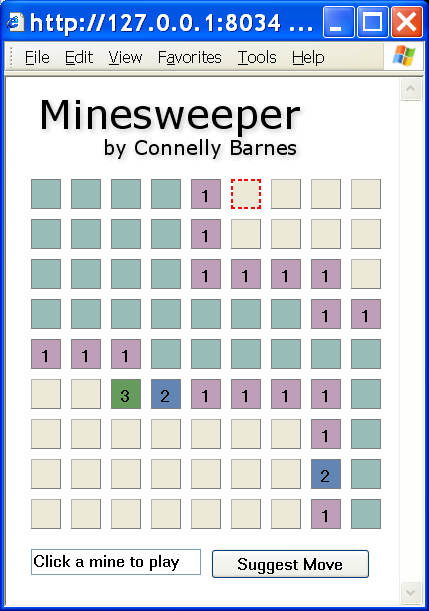
entail module. For the Minesweeper game, when the user chooses "Suggest Move," I add only the knowledge that the player possesses to an AssumptionSet, and then suggest a move if the logic algorithm can deduce that any given square is free of a mine. The result is a perfect deterministic minesweeper AI: if any given move on the board can be made safely, then the AI will suggest that square. If no move can be made safely, then no suggestion will be made. Note that this is also an experiment with using HTML widgets in lieu of using a widget toolkit such as wxPython, so bear with the strange appearance of the window.import X" in Python. So, I created the public domain module autoimp, which imports all modules automatically:>>> from autoimp import *Thus one no longer needs to write "
>>> os.stat('.')
>>> Image.open('test.bmp')
>>> pylab.plot([1,2],[3,4])
>>> scipy.linalg.eig([[1,2],[3,4]])
>>> ...
import X". It would take too long to load every module when one writes "from autoimp import *", so the imported modules are actually proxy objects which lazily load when they are first used.